Automating a Lot Fit Analysis is done by using the MEASURE command and a block.
Layer Properties
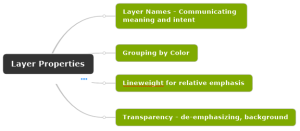
The primary purpose of layers in a CAD file is to set the visual qualities of drawing content. However, in this post I want to focus on how layers are used to convey meaning. This post addresses Name, Color, Linetype, Lineweight, and Transparency.
Ignore Entity Snap Elevation (OSNAPZ)

If you are an AutoCAD user doing 2D drafting you can set Object Snaps to ignore the elevation when snapping to objects not at elevation zero. You must set OSNAPZ system variable to 1. If you are a BricsCAD user doing 2D drafting just toggle the ESNAP setting “Ignore Entity Snap Elevation” ON. The screenshot […]
Creating a Custom Toolbar in BricsCAD
Learn how to add a customized toolbar in BricsCAD called Area SF. You will also learn how to add a tool to the toolbar that runs a macro, putting several commands together to complete the task of labeling the area of a close polyline.
Inserting a Georeferenced Image in BricsCAD
As simple as ATTACH. BricsCAD v25 Pro will detect a world file and populate the Attach Raster Image dialog with Insertion Point coordinates (X,Y, not Z), Scale X and Y, and Rotation Angle. Insert (tab)>References (panel)>Attach. The Select Reference file dialog opens. Browse and select an image file. The Attach Raster Image dialog opens. As […]
BricsCAD Template Files
Specifying the Template file in BricsCAD is an important step in configuring the program to create new drawing files with the settings predefined.
Swing Ties Table in AutoCAD

Create Swing Ties in AutoCAD using a block with some smarts built into it.
Where to find the Autosave file for AutoCAD.
When AutoCAD closes unexpectedly (crash or end task) you may be able to recover some work after your last QSAVE. The Autosave file has a .sv$ file extension and is stored in your Windows temp folder. Use the Drawing Recovery Manager to find the Autosave file. Usually, AutoCAD will detect that it was shut down […]
Dynamic Block Creation – Polar Stretch Example

How to make a dynamic block you can grip edit at either end of a line to place and align
Autodesk Design Review Tips

Design Review Tips is a compilation of useful workflow tips. This post also includes explanations of how things work as well as problems to avoid. See the previous post titled Design Review for NON-CAD Users to get an introduction to the Design Review workflow.
Brian Morse – AdvCAD Curator

Recent Comments