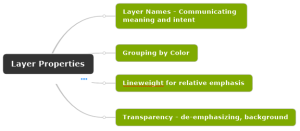
The primary purpose of layers in a CAD file is to set the visual qualities of drawing content. However, in this post I want to focus on how layers are used to convey meaning. This post addresses Name, Color, Linetype, Lineweight, and Transparency.
The primary purpose of layers in a CAD file is to set the visual qualities of drawing content. However, in this post I want to focus on how layers are used to convey meaning. This post addresses Name, Color, Linetype, Lineweight, and Transparency.
Specifying the Template file in BricsCAD is an important step in configuring the program to create new drawing files with the settings predefined.

Graphic Scale block is linked to a viewport. Change the viewport scale and the graphic scale numbers will update automatically. (Link to custom block included.)

Add this macro to your tool palette to automate Building Offset Labels. Name: Building Offset DimensionCommand string: ^C^C_dimaligned;end;\perp;\end;Dimension Style: Building (turns off ext lines and has precision set to 1)

CAD Standards change when a more efficient workflow is developed. NCS adopted the practice of applying color, lineweight, and linetype to the layer instead of using the plot style table to make those effects when plotting. The primary benefit is to reduce the need for plot style tables down to simply changing color to black […]
Beginning with Civil 3D 2016 with service packs installed you have 2 new commands available on the command line only. Linetype3dPlineOn and Linetype3dPlineOff Thanks for the post in the Civil 3D forum by Peter Funk Sr Product Manager
Seems like this is the one thing I overlook time and again when working in a new drawing. When I create MTEXT in a blank drawing it never comes out with the right settings on my first attempt. To solve this issue I typed TEXTSIZE on the command line to set the default text height […]
Named Page Setups are a way to preconfigure your plot settings, matching this sheet size with that plot device to produce consistent repeatable output.
The US National CAD Standard as implemented by the military is located at the CAD/BIM Technology Center. It is called the A/E/C CAD Standard. What has changed recently? Drawing Templates have been grouped together making it much more convenient to download and deploy. The web page containing the links is date stamped 09/07/2010. Groupings are as […]
Redefine blocks using Design Center

Recent Comments